 Chris Lu
5ff49909a0
Chris Lu
5ff49909a0
* fix(s3api/iam): fail config snapshot on empty or malformed IAM files

A full IAM reload reads every identity/policy/service-account/group file
from the filer. When an external secrets tool rewrites a file, a reload
that reads it mid-rewrite sees empty or partially-written content. The
identity, policy and service-account loaders silently skipped such files
(``continue``), so the snapshot was missing entries that still existed
on disk. The atomic swap then installed an incomplete identity set while
``isAuthEnabled`` stayed on, denying unrelated clients mid-reload
(#11259).

The group loader and the read-error paths already fail the snapshot in
this situation (a skipped entry reads as deleted). Apply the same
behavior to empty content and unmarshal failures across the identity,
policy, service-account and group loaders, so a transient mid-rewrite
fails the reload (preserving the last known-good state) instead of
silently dropping entries.

* fix(s3api/iam): coalesce burst IAM config reloads through the reload queue

onIamConfigChange did a full synchronous reload for every identity/policy
file change event. When several independently-refreshing credentials
rewrite their files within the same second, that produced a burst of
dozens of back-to-back full reloads, each reading the whole store and
widening the window where a mid-rewrite file is observed (#11259).

Route every IAM config change through the existing coalescing reload
queue (scheduleReload/reloadRetryLoop) instead. A burst of N events now
collapses into a single reload (plus one tail reload for events that
arrived while one was in flight). scheduleReload gains a reason argument
for the existing log line; the reloadRetryLoop already retries failed
reloads, so the per-event failure handoff is no longer needed.

Tests that asserted on the synchronous reload now wire up the queue
(centralized in newTestS3ApiServerWithMemoryIAM) and poll via
waitForIdentity/waitForIdentityGone. Adds TestOnIamConfigChangeCoalescesBurstReloads
showing 50 events coalesce into <=3 reloads.

* fix(s3api/iam): skip non-JSON auxiliary files before failing IAM snapshot

Per review: the multi-file loaders unmarshal every entry in an IAM
directory, so a non-JSON auxiliary file (README, .DS_Store, a migration
backup such as identity.json.old) would hit the new empty/malformed
errors and reject the whole snapshot, blocking all later IAM reloads.

Only *.json files are IAM objects (SeaweedFS writes identities,
policies, service accounts and groups as <name>.json, and other call
sites already gate on the .json suffix). Skip non-.json entries at the
top of each loader loop, before reading content, so auxiliary files are
ignored while empty/malformed .json files still fail the snapshot.

Adds TestLoadConfigurationIgnoresNonJsonAuxiliaryFiles.

* fix(s3api/iam): reject IAM files with empty identifiers and skip aux in listing

Per review:

- ListPolicyNames listed every regular entry in the policies directory as a
  policy name, including non-JSON auxiliary files, but GetPolicy cannot
  retrieve them. Apply the same .json suffix filter used by the loader so
  the list only exposes retrievable policies.

- json.Unmarshal accepts `{}` and unknown fields. The identity and group
  loaders merge by the decoded Name (not the file name), so a `{}` file
  could install an empty-key record and displace a real one; the
  service-account loader accepted an empty Id. Validate Identity.Name,
  Group.Name and ServiceAccount.Id (via validateServiceAccountId) after
  unmarshal and fail the snapshot on empty identifiers.

Adds TestFilerEtcStoreListPolicyNamesSkipsNonJsonAuxiliary and
empty-identifier regression tests for identity, group and service-account
files.
SeaweedFS






SeaweedFS is a simple and highly scalable distributed file system. There are two objectives:
- to store billions of files!
- to serve the files fast!
One weed binary serves an S3 object store, a POSIX file system, and a lakehouse with S3 Tables, all over the same data. Each blob is one disk read away, capacity grows by starting another volume server, and cloud storage can be cached or tiered transparently.
- Download Binaries for different platforms
- Wiki Documentation
- Community: Slack, Twitter, Telegram, Reddit, Mailing List
- SeaweedFS White Paper and introduction slides: 2025.5, 2021.5, 2019.3
Table of Contents
- Quick Start
- Why SeaweedFS
- Architecture
- Compared to Other Systems
- Benchmark
- Enterprise
- License
- Sponsors
Quick Start
One command
Download the latest binary from the releases page and unzip the single weed (or weed.exe) file, or let the install script put it in /usr/local/bin:
curl -fsSL https://raw.githubusercontent.com/seaweedfs/seaweedfs/master/install.sh | bash
Then start a ready-to-use S3 object store:
AWS_ACCESS_KEY_ID=admin \
AWS_SECRET_ACCESS_KEY=secret \
S3_BUCKET=my-bucket \
./weed mini -dir=./data
That's it. The S3 endpoint is at http://localhost:8333, my-bucket exists, and admin/secret are valid credentials:
AWS_ACCESS_KEY_ID=admin AWS_SECRET_ACCESS_KEY=secret \
  aws --endpoint-url http://localhost:8333 s3 cp README.md s3://my-bucket/
The same process also runs the master, a volume server, the filer, WebDAV, the Iceberg REST catalog, and the Admin UI. Add S3_TABLE_BUCKET=warehouse to also create an Iceberg table bucket, or warehouse:LANCE for a Lance one. Drop the AWS keys to run without authentication for development.
macOS: if the binary is quarantined, run
xattr -d com.apple.quarantine ./weedfirst.
weed mini is auto-tuned for one node and is fine for single-node production, such as an S3 gateway that issues presigned URLs. See Quick Start with weed mini.
Docker
docker run -p 8333:8333 -v weed-data:/data \
  -e AWS_ACCESS_KEY_ID=admin \
  -e AWS_SECRET_ACCESS_KEY=secret \
  -e S3_BUCKET=my-bucket \
  chrislusf/seaweedfs
Same behavior as the weed mini command above.
Docker Compose
To run master, volume server, filer, S3, and WebDAV as separate services:
wget https://raw.githubusercontent.com/seaweedfs/seaweedfs/master/docker/seaweedfs-compose.yml
wget -P prometheus https://raw.githubusercontent.com/seaweedfs/seaweedfs/master/docker/prometheus/prometheus.yml
docker compose -f seaweedfs-compose.yml -p seaweedfs up
Docker Compose for S3 adds credentials, and the docker/compose folder has variants for replication, mounts, message queues, and more.
Kubernetes with Helm
helm repo add seaweedfs https://seaweedfs.github.io/seaweedfs/helm
helm install seaweedfs seaweedfs/seaweedfs -n seaweedfs --create-namespace -f values.yaml
A production-shaped values.yaml for a three-node cluster: two copies of every write, three masters, and an S3 endpoint with credentials and a bucket.
global:
  seaweedfs:
    enableReplication: true
    replicationPlacement: "001"   # one extra copy on another server; "002" for two

master:
  replicas: 3
  data:
    type: persistentVolumeClaim   # the cluster's default storage class; add storageClass to pick one
    size: 1Gi

volume:
  replicas: 3                     # at least 1 + the sum of the replication digits
  dataDirs:
    - name: data
      type: persistentVolumeClaim
      size: 500Gi
      maxVolumes: 0               # size the volume count from the disk

filer:
  replicas: 2
  data:
    type: persistentVolumeClaim
    size: 20Gi

s3:
  enabled: true
  replicas: 2
  enableAuth: true
  credentials:
    admin:
      accessKey: admin
      secretKey: change-me
  createBuckets:
    - name: app-storage
The S3 endpoint is the seaweedfs-s3 service on port 8333. Helm Chart Recipes has values for a development cluster, a lakehouse with the Iceberg catalog exposed, filer metadata on PostgreSQL, and node-local disks. The SeaweedFS Operator and the CSI driver are the other Kubernetes paths.
Build from source
git clone https://github.com/seaweedfs/seaweedfs.git
cd seaweedfs/weed && make install
weed lands in $GOPATH/bin. Getting Started covers running master, volume, filer, and S3 as separate processes.
Scale out
Capacity is a volume server. Start one on any machine with disk and point it at the master:
weed volume -dir=/data -master=<master_host>:9333
Nothing rebalances until you ask it to. Throughput is a filer or S3 gateway; they are stateless, so run as many as you need behind a load balancer. Production Setup walks through a multi-node cluster.
Why SeaweedFS
Fast
- One disk read per blob. A small file is one blob; a large file is split into chunks of a few MB, each its own blob. A volume server keeps a 16-byte index entry per blob in memory and reads it in a single seek, also for erasure-coded data.
- The master is not in the read path. Clients cache the volume-to-server mapping and talk to volume servers directly.
- 40 bytes of metadata per file on disk. Small files are packed into append-only volume files, so there is no per-file inode, no per-file metadata file, no fragmentation, and writes are SSD friendly.
- Hot data is replicated; erasure coding is applied to warm data in the background, so writes never pay the encoding cost.
- The Rust volume server is a drop-in for higher throughput and lower tail latency on the same on-disk format.
On one laptop, weed benchmark writes 1KB files at 15,700 per second and reads them back at 47,000 per second, and a mixed S3 warp run totals 3.2 GiB/s. Numbers are in the Benchmark section; throughput grows with volume servers and gateways.
Scalable
- The master tracks volumes, not files. A cluster with billions of files has a few thousand volumes, so the master stays small. One master is enough for most clusters; run three for Raft failover.
- Adding a server adds capacity with no data reshuffle. Balancing, vacuum, erasure coding, and repair run on demand from
weed shellor the maintenance worker. - Filer and S3 gateways are stateless and scale linearly. Directory metadata lives in a store you already run: LevelDB, RocksDB, SQLite, MySQL, PostgreSQL, Cassandra, HBase, MongoDB, Redis, Elasticsearch, etcd, TiKV, FoundationDB, YDB, ArangoDB, Tarantool, and MySQL or PostgreSQL compatible databases such as TiDB, CockroachDB, and MemSQL.
- Rack and data center aware replication, tiered storage across disk types, and transparent cloud tiering for unlimited capacity.
- Files from a byte to tens of TB. Volumes up to 8TB with the large-disk build.
The most complete S3 API
The S3 gateway implements the object, bucket, S3 Tables, IAM, and STS APIs on one endpoint, so the AWS SDKs and CLI, rclone, restic, Spark, and Trino work unchanged.
| API | Operations |
|---|---|
| S3 bucket and object | 73 |
| S3 Tables | 36 |
| IAM | 39 |
| STS | 5 |
- Versioning, Object Lock with retention and legal hold, lifecycle rules, tagging, CORS, conditional reads and writes, checksums, presigned URLs, browser POST uploads, multipart uploads, and an atomic RenameObject.
- Bucket policies with conditions and variables; IAM users, groups, and policies; STS with OIDC, LDAP, and Kubernetes service accounts.
- SSE-S3, SSE-KMS, and SSE-C server-side encryption, with OpenBao and Vault, AWS KMS, Azure Key Vault, and GCP KMS as key providers.
- Audit log, bucket quota, and rate limiting.
- Each bucket is its own collection, so deleting a bucket is instant.
The full operation list is in Amazon S3 API, and Supported APIs vs MinIO compares. The S3 compatibility suite and the SDK, IAM, SSE, policy, and Spark integration tests run in CI on every change.
A data warehouse with S3 Tables
SeaweedFS is a lakehouse in one system. S3 Table Buckets hold Apache Iceberg tables by default, or Lance tables for vectors and multimodal data, and the built-in Iceberg REST Catalog and Lance namespace serve them directly. There is no Hive Metastore, Glue, or separate catalog service to deploy, secure, and back up.
- Query engines operate on the same tables at the same time: Spark, Trino, Dremio, DuckDB, Apache Doris, RisingWave, ClickHouse, and LanceDB. Catalog commits are atomic compare-and-swap, so concurrent writers are safe. Lakekeeper can front the same storage with STS-vended credentials.
- Automated table maintenance: compaction, snapshot expiration, orphan file removal, and manifest rewriting, configured per bucket or table through the S3 Tables maintenance APIs, and the same for Lance.
- IAM at the bucket, namespace, and table level with standard bucket policies, see S3 Tables Security.
- A Hadoop compatible file system for Spark, Flink, and HBase.
S3_TABLE_BUCKET=warehouse ./weed mini -dir=./data brings the whole stack up on a laptop.
A fast cache for cloud storage
Cloud Drive mounts a bucket from S3, Google Cloud Storage, Azure, Backblaze B2, Wasabi, Storj, or any S3-compatible store into SeaweedFS and serves it at local speed:
- Metadata is pulled once, so listing, stat, and directory walks cost no cloud API calls.
- File content is downloaded once, on first read or warmed by folder, name pattern, size, or age, and cached with the capacity of the whole cluster: cache everything, no churn.
- Local writes complete at local latency and are written back to the cloud asynchronously in the cloud's native layout, so other tools keep reading the bucket directly.
- Uncache by the same rules to free local disk while keeping the metadata.
Cloud Tier goes the other direction, moving whole warm volumes to cloud storage while keeping one-read access, and the Gateway to Remote Object Storage mirrors every bucket to a remote store. Faster and cheaper than reading the cloud directly.
Active-active replication and more
- Active-active or active-passive replication between clusters, continuous and resumable, for the whole tree or chosen folders, across data centers.
- Filer store replication for metadata HA, async backup to cloud storage, metadata backup, and change data capture with webhooks on every metadata event.
- The same data as a FUSE mount on Linux, macOS, and Windows, over WebDAV, SFTP, HDFS, HTTP, and TUS resumable uploads; on Kubernetes through the CSI driver and Operator.
- AES256-GCM encryption at rest, TLS and mTLS between components, JWT-signed volume access, and FIPS builds.
- Admin UI, Prometheus metrics, TTL per file or volume, automatic compression and compaction, and seaweed-up for bare-metal clusters.
Architecture
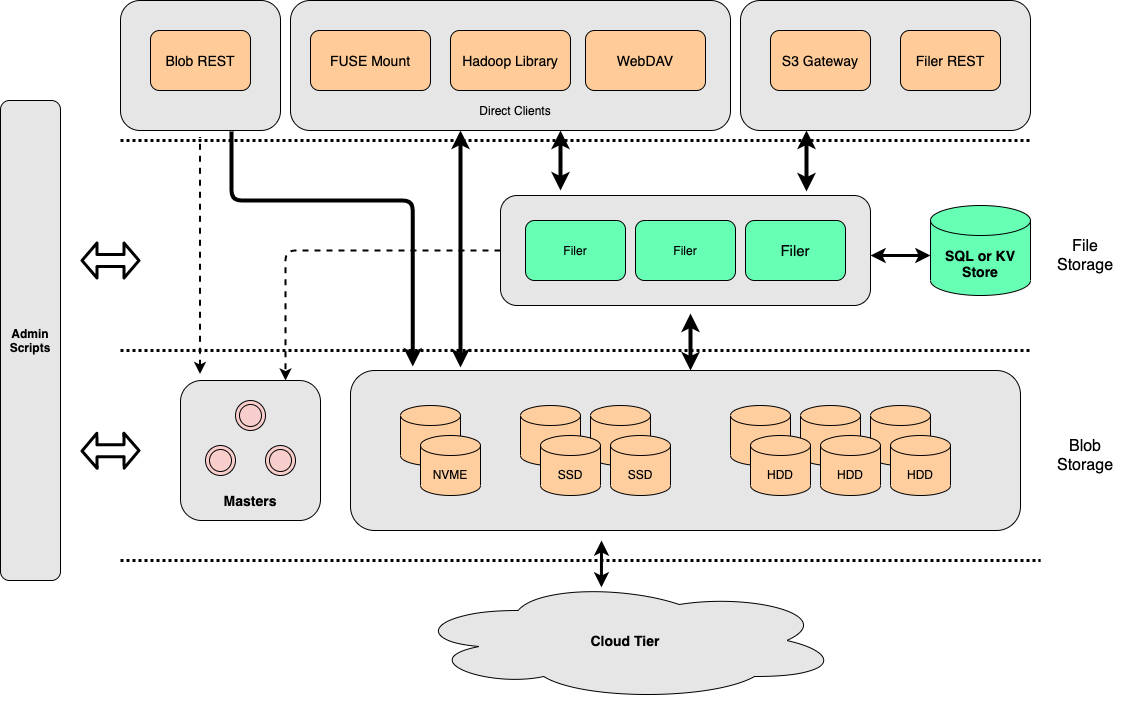
- Master servers, one or a Raft group of three, track which volume lives on which volume server and hand out file ids. They are not in the read path.
- Volume servers store blobs in append-only volume files, keep a 16-byte in-memory index per blob, and replicate or erasure-code at the volume level.
- Filer servers add directories and files on top, with metadata in a store of your choice, and expose HTTP, S3, WebDAV, SFTP, FUSE, and the table catalogs.
The blob store started from Facebook's Haystack, erasure coding takes ideas from f4, and the whole has a lot in common with Tectonic and Colossus. How file ids are assigned, written, and looked up, and why a master that tracks volumes scales, is in Blob Store Architecture; the services are in Components and the white paper.
Compared to Other Systems
Most other distributed file systems seem more complicated than necessary.
SeaweedFS is meant to be fast and simple, in both setup and operation. If you do not understand how it works when you reach here, we've failed! Please raise an issue with any questions or update this file with clarifications.
SeaweedFS is constantly moving forward. Same with other systems. These comparisons can be outdated quickly. Please help to keep them updated.
Compared to HDFS
HDFS uses the chunk approach for each file, and is ideal for storing large files.
SeaweedFS is ideal for serving relatively smaller files quickly and concurrently.
SeaweedFS can also store extra large files by splitting them into manageable data chunks, and store the file ids of the data chunks into a meta chunk. This is managed by "weed upload/download" tool, and the weed master or volume servers are agnostic about it.
Compared to GlusterFS, Ceph
The architectures are mostly the same. SeaweedFS aims to store and read files fast, with a simple and flat architecture. The main differences are
- SeaweedFS optimizes for small files, ensuring O(1) disk seek operation, and can also handle large files.
- SeaweedFS statically assigns a volume id for a file. Locating file content becomes just a lookup of the volume id, which can be easily cached.
- SeaweedFS Filer metadata store can be any well-known and proven data store, e.g., Redis, Cassandra, HBase, Mongodb, Elastic Search, MySql, Postgres, Sqlite, MemSql, TiDB, CockroachDB, Etcd, YDB etc, and is easy to customize.
- SeaweedFS Volume server also communicates directly with clients via HTTP, supporting range queries, direct uploads, etc.
| System | File Metadata | File Content Read | POSIX | REST API | Optimized for large number of small files |
|---|---|---|---|---|---|
| SeaweedFS | lookup volume id, cacheable | O(1) disk seek | Yes | Yes | |
| SeaweedFS Filer | Linearly Scalable, Customizable | O(1) disk seek | FUSE | Yes | Yes |
| GlusterFS | hashing | FUSE, NFS | |||
| Ceph | hashing + rules | FUSE | Yes | ||
| MooseFS | in memory | FUSE | No | ||
| MinIO | separate meta file per drive for each file | Yes | No | ||
| RustFS | separate meta file per drive for each file | Yes | No |
GlusterFS stores files, both directories and content, in configurable volumes called "bricks". It hashes the path and filename into ids, and assigned to virtual volumes, and then mapped to "bricks".
Compared to MooseFS
MooseFS chooses to neglect small file issue. From moosefs 3.0 manual, "even a small file will occupy 64KiB plus additionally 4KiB of checksums and 1KiB for the header", because it "was initially designed for keeping large amounts (like several thousands) of very big files"
MooseFS Master Server keeps all meta data in memory. Same issue as HDFS namenode.
Compared to Ceph
Ceph can be setup similar to SeaweedFS as a key->blob store. It is much more complicated, with the need to support layers on top of it. Here is a more detailed comparison
SeaweedFS has a centralized master group to look up free volumes, while Ceph uses hashing and metadata servers to locate its objects. Having a centralized master makes it easy to code and manage.
Ceph, like SeaweedFS, is based on the object store RADOS. Ceph is rather complicated with mixed reviews.
Ceph uses CRUSH hashing to automatically manage data placement, which is efficient to locate the data. But the data has to be placed according to the CRUSH algorithm. Any wrong configuration would cause data loss. Topology changes, such as adding new servers to increase capacity, will cause data migration with high IO cost to fit the CRUSH algorithm. SeaweedFS places data by assigning them to any writable volumes. If writes to one volume failed, just pick another volume to write. Adding more volumes is also as simple as it can be.
SeaweedFS is optimized for small files. Small files are stored as one continuous block of content, with at most 8 unused bytes between files. Small file access is O(1) disk read.
SeaweedFS Filer uses off-the-shelf stores, such as MySql, Postgres, Sqlite, Mongodb, Redis, Elastic Search, Cassandra, HBase, MemSql, TiDB, CockroachCB, Etcd, YDB, to manage file directories. These stores are proven, scalable, and easier to manage.
| SeaweedFS | comparable to Ceph | advantage |
|---|---|---|
| Master | MDS | simpler |
| Volume | OSD | optimized for small files |
| Filer | Ceph FS | linearly scalable, Customizable, O(1) or O(logN) |
Compared to MinIO, RustFS
Please note, as Apr 25, 2026 MinIO ceased development. It's strongly discouraged to use that unmaintained software with multiple security bugs. RustFS is a MinIO reimplementation in Rust, Apache 2.0 licensed and still developed, keeping MinIO's storage model down to a byte-compatible on-disk format. So the points below apply to both.
MinIO followed AWS S3 closely and was ideal for testing for S3 API. It had good UI, policies, versionings, etc. SeaweedFS is trying to catch up here.
The metadata are in simple files. Each file write incurs extra writes to the corresponding meta file, on every drive of the erasure set. Changing only tags or retention rewrites that meta file on all of them, so the write amplification does not shrink with object size.
There is no optimization for lots of small files. The files are simply stored as is to local disks. Plus the extra meta file and shards for erasure coding, it only amplifies the LOSF problem.
Multiple disk IO are needed to read one file. SeaweedFS has O(1) disk reads, even for erasure coded files.
Erasure coding is full-time. SeaweedFS uses replication on hot data for faster speed and optionally applies erasure coding on warm data.
No POSIX-like API support.
There are specific requirements on storage layout, which makes it hard to scale out and to maintain. An erasure set must be 2 to 16 drives and must divide the drive list symmetrically, and capacity grows or shrinks a whole pool at a time. In SeaweedFS, just start one volume server pointing to the master. That's all.
Benchmark
Unscientific single-machine numbers from a MacBook with an SSD. weed benchmark, 1 million 1KB files, concurrency 16:
| Requests per second | p50 | p99 | |
|---|---|---|---|
| Write | 15,708 | 0.8 ms | 2.6 ms |
| Random read | 47,019 | 0.3 ms | 0.7 ms |
make benchmark runs warp mixed S3 traffic against a local weed server:
Mixed operations.
Operation: DELETE, 10%, Concurrency: 20, Ran 42s.
 * Throughput: 55.13 obj/s

Operation: GET, 45%, Concurrency: 20, Ran 42s.
 * Throughput: 2477.45 MiB/s, 247.75 obj/s

Operation: PUT, 15%, Concurrency: 20, Ran 42s.
 * Throughput: 825.85 MiB/s, 82.59 obj/s

Operation: STAT, 30%, Concurrency: 20, Ran 42s.
 * Throughput: 165.27 obj/s

Cluster Total: 3302.88 MiB/s, 550.51 obj/s over 43s.
Read throughput is bounded by the random read speed of the disks, and grows with every volume server added. More numbers, including multi-node, FUSE, and Hadoop, are in Benchmarks, S3 API Benchmark, FIO benchmark, and Independent Benchmarks.
Enterprise
For enterprise users, please visit seaweedfs.com for the SeaweedFS Enterprise Edition, which has advanced features, including data recovery, self-healing storage, customizable erasure coding, EC vacuum and repair, etc.
License
Licensed under the Apache License, Version 2.0 (the "License"); you may not use this file except in compliance with the License. You may obtain a copy of the License at
http://www.apache.org/licenses/LICENSE-2.0
Unless required by applicable law or agreed to in writing, software distributed under the License is distributed on an "AS IS" BASIS, WITHOUT WARRANTIES OR CONDITIONS OF ANY KIND, either express or implied. See the License for the specific language governing permissions and limitations under the License.
The text of this page is available for modification and reuse under the terms of the Creative Commons Attribution-Sharealike 3.0 Unported License and the GNU Free Documentation License (unversioned, with no invariant sections, front-cover texts, or back-cover texts).
Sponsors
Sponsor SeaweedFS via Patreon
SeaweedFS is an independent Apache-licensed open source project with its ongoing development made possible entirely thanks to the support of these awesome backers. If you'd like to grow SeaweedFS even stronger, please consider joining our sponsors on Patreon.
Your support will be really appreciated by me and other supporters!
Gold Sponsors




Star History
