 Chris LuandClaude Opus 5.5
862913d199
* volume: remove files a failed VolumeEcShardsCopy wrote

The shard files were copied before the .ecx, so a source holding a
0-byte index failed the request only after its shards had landed, and
nothing removed them: every retried move stranded another unmounted
shard on a new disk.

Copy the .ecx first, staged beside its target, so a bad index fails
before any shard lands; rename it into place only after the shards and
sidecars have copied, so a failed copy never truncates or replaces an
.ecx the destination already has. On any error, remove exactly the
files this call created; files already on the disk (an existing
holder's shards, index or journal) are left alone. Go and Rust volume
servers behave the same.

Claude-Session: https://claude.ai/code/session_011UpvafcfUuC2mLxNAXLQJi

* ec_balance: skip EC volumes whose every holder reports an empty .ecx

A shard copy refuses a 0-byte .ecx, so detection proposed the same
failing move of such a volume every cycle. Leave volumes with no
holder reporting a needle out of planning; their shards still count
toward disk occupancy.

Claude-Session: https://claude.ai/code/session_011UpvafcfUuC2mLxNAXLQJi

* volume: serialize VolumeEcShardsCopy per volume

Overlapping copies of one vid shared the staged .ecx, and a failed copy's
cleanup removed shards that a concurrent copy had already committed and
mounted. Hold a per-vid EC lifecycle lock across the whole copy and its
cleanup, named as in the enterprise build (Store.EcLifecycleLock /
ec_lifecycle_lock).

Co-Authored-By: Claude Opus 5.5 <noreply@anthropic.com>

* volume: overwrite an existing .ecx in place when committing a copied index

A mounted EcVolume reads its index through an open handle, so renaming
the staged copy over it left the reader on the replaced inode: tombstones
the source had folded into its .ecx never reached the mounted holder.
An index already on the disk is now overwritten in place, as before the
staging change; a fresh destination still gets the rename. Go and Rust.

Co-Authored-By: Claude Opus 5.5 <noreply@anthropic.com>

* volume: stage replacements of shards a VolumeEcShardsCopy finds on disk

The shard transfer opened an existing destination shard with O_TRUNC and
removed it on a stream or write error, so a failed retry deleted a shard
this disk already held. A shard already present is now copied to
<shard>.copying and renamed into place only after every other file has
copied; a mounted copy is reopened so it serves the new file. Fresh
shards still write in place and are removed on failure. Go and Rust.

Co-Authored-By: Claude Opus 5.5 <noreply@anthropic.com>

* volume: stage the .vif and .ecsum a VolumeEcShardsCopy brings until commit

The sidecars landed as soon as they transferred, ahead of the deferred
.ecx commit, so a failure after them left a new .vif beside the index
the failed copy kept. They are now staged as .copying and renamed into
place with the shards and index once every transfer has succeeded; a
source without one still stages nothing. Go and Rust.

Co-Authored-By: Claude Opus 5.5 <noreply@anthropic.com>

* volume: run a Rust VolumeEcShardsCopy to completion when its caller goes away

tonic drops a cancelled handler future at its current await, which
released the EC lifecycle lock while file operations the copy had started
(a cleanup remove_file on the blocking pool, a create or rename) could
still land; a retry taking the lock could then lose its files to them.
The copy now runs in a spawned task that owns the lock, as Go's handler
runs to completion.

Co-Authored-By: Claude Opus 5.5 <noreply@anthropic.com>

* volume: fail the sidecar copy tests with an unreadable source .ecsum

A directory at the source path reads as "not found" on volume servers
that skip non-regular EC files, which turned the failure into a no-op.
A mode-000 file fails the transfer on every implementation; root and
Windows, which can read it, skip the test.

Co-Authored-By: Claude Opus 5.5 <noreply@anthropic.com>

* volume: copy each shard a VolumeEcShardsCopy lists once

A shard listed twice and already held here was staged twice; the first
commit rename consumed the staged file, so the second failed the request
after the shard was replaced, and every retry failed the same way.

Co-Authored-By: Claude Opus 5.5 <noreply@anthropic.com>

* volume: wait out an in-flight VolumeEcShardsCopy before mounting its shards

A shard the copy had already landed could be mounted while the copy was
still running; the copy's failure cleanup then removed the file but left
the shard registered and announced. MountEcShards takes the per-volume
lifecycle lock, as the enterprise build already does, and the Rust mount
handler takes the same lock.

Co-Authored-By: Claude Opus 5.5 <noreply@anthropic.com>

* volume: fail a VolumeEcShardsCopy whose replaced mounted shard cannot be reopened

The copy reported success while the mounted shard kept serving the
replaced file. The error lets the caller retry the copy instead of
treating the shard as delivered.

Co-Authored-By: Claude Opus 5.5 <noreply@anthropic.com>

* volume: check which transfer fails in the EC copy cleanup tests

An earlier failure, before any shard or sidecar landed, would leave the
destination unchanged and pass every assertion without exercising the
cleanup. The sidecar test also skips on Windows, where a mode-000 file
stays readable.

Co-Authored-By: Claude Opus 5.5 <noreply@anthropic.com>

* volume: fail the sidecar transfer in the EC copy test by injection

A mode-000 file is still readable to root and on Windows, so the test
skipped there. The source now returns an error for the .ecsum request
only, and the test checks that it served .vif before that failure.

Co-Authored-By: Claude Opus 5.5 <noreply@anthropic.com>

* volume: take the EC lifecycle lock for a blanket full teardown

A teardown acknowledged while a detached copy of the same volume was
still waiting on its source let that copy recreate the index and shards
afterwards. Go and Rust now wait for the copy, as the enterprise build
does.

Co-Authored-By: Claude Opus 5.5 <noreply@anthropic.com>

* volume: keep the request id on a Rust EC shard copy

The copy now runs in a spawned task, outside the gRPC layer's request id
scope, so its CopyFile calls to the source went out with a new id. Carry
the caller's id into the task.

Co-Authored-By: Claude Opus 5.5 <noreply@anthropic.com>

* volume: unmount a replaced EC shard whose reopen fails

The failed copy left the mount reading the replaced file's inode, so the
destination kept serving the old shard. Unmount it, which also reports
the removal to the master, so a retry copies and mounts it again.

Co-Authored-By: Claude Opus 5.5 <noreply@anthropic.com>

* volume: make the Rust EC copy tests fail for the right reason

The sidecar test now serves a directory as the source .ecsum, which root
cannot read either, so it no longer returns early there. The cancel test
holds the store until the handler's join reports the cancellation, so a
copy that finished before the abort can no longer pass it.

Co-Authored-By: Claude Opus 5.5 <noreply@anthropic.com>

* volume: stage every shard a VolumeEcShardsCopy transfers

A shard missing here was written in place with a cleanup guard armed
before its transfer started, so a failed copy removed a shard that
ReceiveFile wrote meanwhile. Every shard is now staged, and only one
that did not exist when it is moved into place is removed on failure.

Co-Authored-By: Claude Opus 5.5 <noreply@anthropic.com>

* volume: take the EC lifecycle lock for VolumeEcShardsRebuild

A rebuild folds the deletion journal into .ecx. Run during a copy of the
same volume, the copy's index then replaced the folded tombstones. Go
and Rust take the lock the enterprise build already takes here.

Co-Authored-By: Claude Opus 5.5 <noreply@anthropic.com>

* volume: check the staged .vif bytes in the EC sidecar failure test

A source without the optional .vif also returns success, so the served
extension list could not prove the transfer. The test now reads the
staged .vif when the .ecsum request fails and compares it with the
source's.

Co-Authored-By: Claude Opus 5.5 <noreply@anthropic.com>

* volume: unmount a failed reopen's shard on the copy's disk only

UnmountEcShards walks every disk, so a reopen failure on the destination
also unmounted a healthy copy of the same shard on a sibling disk. The
copy now unloads the shard from its own disk and reports that disk's
removal.

Co-Authored-By: Claude Opus 5.5 <noreply@anthropic.com>

* volume: take the EC lifecycle lock for an ordinary EC shard delete

Shards a copy has staged are invisible to the delete's last-shard check,
so deleting the only canonical shard removed the index the copy was
about to commit its shards against. Go and Rust deletes now wait for an
in-flight copy of the same volume.

Co-Authored-By: Claude Opus 5.5 <noreply@anthropic.com>

* volume: leave a mounted shard's copied file in place on copy failure

A shard mounted on the copy's disk whose file was missing got the copied
file reopened into its mount, then that file was unlinked by a later
failure's cleanup while the mount kept serving it. Only an unmounted
shard's new file is removed now.

Co-Authored-By: Claude Opus 5.5 <noreply@anthropic.com>

* volume: skip repeated shard ids with a seen set

Scanning the request prefix for each id made a request with many
repeats quadratic while the copy held the volume's lifecycle lock.

Co-Authored-By: Claude Opus 5.5 <noreply@anthropic.com>

* volume: make the Go EC copy and lock tests observe their effects

The fake source counts requests per extension, so the duplicate-id test
proves .ec05 is fetched once, and returns fixture errors instead of
failing the test from its handler goroutine. The staged .vif reaches
the test through a channel. The mount and teardown lock tests seed real
files and check that nothing happened while the lock was held and that
the operation took effect after it was released.

Co-Authored-By: Claude Opus 5.5 <noreply@anthropic.com>

* volume: poll the handler directly in the Rust EC lifecycle lock tests

A spawned handler that had not run when the 200 ms timer fired passed
the blocking check without ever reaching the lock. The tests now poll
the pinned handler future themselves, which guarantees it is waiting on
the lock, and cover the ordinary shard delete as well.

Co-Authored-By: Claude Opus 5.5 <noreply@anthropic.com>

* volume: observe the lifecycle-lock waiter in EC copy lock tests

The mount, teardown, shard-delete and rebuild tests slept 200 ms while
holding the lock, so a handler scheduled only after the unlock passed
without ever taking it. Wait until the handler's goroutine is blocked on
the mutex instead; each test now fails within its timeout if the handler
skips the lock.

Co-Authored-By: Claude Opus 5.5 <noreply@anthropic.com>

* volume: check the shard is staged before the failure-path write in a copy test

Co-Authored-By: Claude Opus 5.5 <noreply@anthropic.com>

* volume: recover a missing EC index under the volume's lifecycle lock

Missing-index recovery fetched the index and then ran a store-wide mount
of every orphan shard, without the per-volume lifecycle lock. It could
mount shards an in-flight VolumeEcShardsCopy of another volume had just
renamed in, and that copy's failure cleanup then unlinked a mounted shard.
Each recovered volume now holds its lifecycle lock across a re-check, the
fetch and a mount restricted to that volume.

Co-Authored-By: Claude Opus 5.5 <noreply@anthropic.com>

* volume(rs): recover a missing EC index under the volume's lifecycle lock

Mirror of the Go change: recover_missing_ec_indexes takes the volume's
ec_lifecycle_lock, re-checks that the index is still missing, fetches it,
and mounts only that volume's shards through mount_recovered_ec_shards_only,
so an in-flight VolumeEcShardsCopy of another volume never has its
renamed-in shards mounted from under it.

Co-Authored-By: Claude Opus 5.5 <noreply@anthropic.com>

* volume: mount a volume whose index a copy installed during recovery

Recovery re-checks under the lifecycle lock that the index is still
missing. When a copy installed it in the meantime, the re-check skipped
the mount too, and the volume's other shards stayed unmounted because
later scans no longer list it. Skip only the fetch and still mount the
volume's orphan shards under the lock, in Go and Rust.

Co-Authored-By: Claude Opus 5.5 <noreply@anthropic.com>

* volume: fetch a recovered EC index into the disk the locked re-check found

The re-check under the lifecycle lock only kept a yes/no answer, so the
fetch still wrote to the destination from the first scan, which may be a
disk that has since gone away. Fetch into the record the re-check returned.

Co-Authored-By: Claude Opus 5.5 <noreply@anthropic.com>

* volume: mount a copy-installed EC index even when no peer is known

Recovery skipped the locked step when the master was unreachable, the
lookup failed or no peer was listed. A copy that installed the index after
discovery then left the volume's other shards unmounted, and later scans
no longer list it. Always run the locked re-check, and give up for lack of
peers only when the index is still missing.

Co-Authored-By: Claude Opus 5.5 <noreply@anthropic.com>

* volume: grow the stack buffer before scanning for a lock waiter

A full buffer can cut off the handler goroutine's stack, so the test would
report a handler that is waiting as one that never waited.

Co-Authored-By: Claude Opus 5.5 <noreply@anthropic.com>

* volume(rs): fetch a recovered EC index into the disk the locked re-check found

Mirror of the Go change: fetch into the record the re-check under the
lifecycle lock returned instead of the destination from the first scan.

Co-Authored-By: Claude Opus 5.5 <noreply@anthropic.com>

* volume(rs): mount a copy-installed EC index even when no peer is known

Mirror of the Go change: a failed lookup or an empty peer list no longer
skips the locked re-check, so a volume whose index a copy installed after
discovery still gets its orphan shards mounted.

Co-Authored-By: Claude Opus 5.5 <noreply@anthropic.com>

* volume(rs): run missing-index recovery to completion when the mount RPC is cancelled

Dropping the mount handler mid-recovery released the volume's lifecycle
lock while the .ecj merge it had started on a blocking thread was still
landing, so a teardown could remove the volume before that late write.
Run recovery on its own task, as the copy handler does, so the lock is
held until it finishes; Go's handler already runs it to completion.

Co-Authored-By: Claude Opus 5.5 <noreply@anthropic.com>

* volume: skip other volumes before stat in a single-volume EC scan

Recovery re-checks and mounts each volume with its own scans, so a
request with many orphans repeated whole-store discovery once per volume.
The index-owner and orphan-shard scans now take the same volume filter
and drop other volumes' files by name, before the per-file stat, and the
locked re-check scans only its own volume.

Co-Authored-By: Claude Opus 5.5 <noreply@anthropic.com>

* volume(rs): skip other volumes before stat in a single-volume EC scan

Mirror of the Go change: the index-owner and orphan-shard scans take the
volume filter and drop other volumes' files by name before the per-file
stat, so recovery's per-volume re-check and mount no longer repeat
whole-store discovery under the store lock for every orphan.

Co-Authored-By: Claude Opus 5.5 <noreply@anthropic.com>

* volume(rs): announce shards recovered after the mount RPC was cancelled

Recovery now outlives a cancelled mount RPC, but the heartbeat nudge
stayed in the handler, so shards it mounted after the caller left waited
for the next full EC heartbeat. Nudge it from the recovery task, as Go's
loads announce each recovered shard.

Co-Authored-By: Claude Opus 5.5 <noreply@anthropic.com>

* volume: match the collection as well as the volume id in the recovery re-check

Discovery keys orphans by (collection, vid), but the locked re-check
matched the vid only. Two collections with orphans of the same vid could
both resolve to the first record, so the other's index was never fetched.

Co-Authored-By: Claude Opus 5.5 <noreply@anthropic.com>

* volume(rs): match the collection as well as the volume id in the recovery re-check

Mirror of the Go change.

Co-Authored-By: Claude Opus 5.5 <noreply@anthropic.com>

---------

Co-authored-by: Claude Opus 5.5 <noreply@anthropic.com>
SeaweedFS



SeaweedFS is a simple and highly scalable distributed file system. There are two objectives:
- to store billions of files!
- to serve the files fast!
One SeaweedFS cluster serves an S3 object store, a POSIX file system, a lakehouse with S3 Tables and a built-in Iceberg REST Catalog, and vector search with S3 Vector Buckets, all on shared storage. Each blob is one disk read away, capacity grows by starting another volume server, and cloud storage can be cached or tiered transparently. Blob reads and writes have O(1) complexity and can run at the full speed supported by the underlying hardware.

- Download Binaries for different platforms
- Wiki Documentation
- HTTP REST API for the filer, master, and volume servers
- Community: Slack, Twitter, Telegram, Reddit, Mailing List
- SeaweedFS White Paper and introduction slides: 2025.5, 2021.5, 2019.3
Table of Contents
- Quick Start
- Why SeaweedFS
- Architecture
- Compared to Other Systems
- Benchmark
- Enterprise
- License
- Sponsors
Quick Start
One command
Download the latest binary from the releases page and unzip the single weed (or weed.exe) file, or let the install script put it in /usr/local/bin:
curl -fsSL https://raw.githubusercontent.com/seaweedfs/seaweedfs/master/install.sh | bash
For SeaweedFS Enterprise binaries, pass --enterprise to the script: ... | bash -s -- --enterprise.
Then start a ready-to-use S3 object store:
AWS_ACCESS_KEY_ID=admin \
AWS_SECRET_ACCESS_KEY=secret \
S3_BUCKET=my-bucket \
./weed mini -dir=./data
That's it. The S3 endpoint is at http://localhost:8333, my-bucket exists, and admin/secret are valid credentials:
AWS_ACCESS_KEY_ID=admin AWS_SECRET_ACCESS_KEY=secret \
  aws --endpoint-url http://localhost:8333 s3 cp README.md s3://my-bucket/
The same process also runs the master, a volume server, the filer, WebDAV, the Iceberg REST catalog, and the Admin UI. Add S3_TABLE_BUCKET=warehouse to also create an Iceberg table bucket, or warehouse:LANCE for a Lance one. Drop the AWS keys to run without authentication for development.
Without Admin authentication or mTLS, weed mini binds the Admin UI/API and its worker gRPC control plane to loopback rather than -ip.bind. Set WEED_ADMIN_PASSWORD or configure https.admin mTLS to keep the network bind. Remote workers must opt in with -admin.worker.ip=<address> and should configure grpc.admin mTLS. -admin.allowInsecureBind restores the legacy unauthenticated network bind and should only be used on an isolated network.
macOS: if the binary is quarantined, run
xattr -d com.apple.quarantine ./weedfirst.
weed mini is auto-tuned for one node and is fine for single-node production, such as an S3 gateway that issues presigned URLs. See Quick Start with weed mini.
Docker
docker run -p 8333:8333 -v weed-data:/data \
  -e AWS_ACCESS_KEY_ID=admin \
  -e AWS_SECRET_ACCESS_KEY=secret \
  -e S3_BUCKET=my-bucket \
  chrislusf/seaweedfs
Same behavior as the weed mini command above.
Docker Compose
To run master, volume server, filer, S3, and WebDAV as separate services:
wget https://raw.githubusercontent.com/seaweedfs/seaweedfs/master/docker/seaweedfs-compose.yml
wget -P prometheus https://raw.githubusercontent.com/seaweedfs/seaweedfs/master/docker/prometheus/prometheus.yml
docker compose -f seaweedfs-compose.yml -p seaweedfs up
Docker Compose for S3 adds credentials, and the docker/compose folder has variants for replication, mounts, message queues, and more.
Kubernetes with Helm
helm repo add seaweedfs https://seaweedfs.github.io/seaweedfs/helm
helm install seaweedfs seaweedfs/seaweedfs -n seaweedfs --create-namespace -f values.yaml
A production-shaped values.yaml for a three-node cluster: two copies of every write, three masters, and an S3 endpoint with credentials and a bucket.
global:
  seaweedfs:
    enableReplication: true
    replicationPlacement: "001"   # one extra copy on another server; "002" for two

master:
  replicas: 3
  data:
    type: persistentVolumeClaim   # the cluster's default storage class; add storageClass to pick one
    size: 1Gi

volume:
  replicas: 3                     # at least 1 + the sum of the replication digits
  dataDirs:
    - name: data
      type: persistentVolumeClaim
      size: 500Gi
      maxVolumes: 0               # size the volume count from the disk

filer:
  replicas: 2
  data:
    type: persistentVolumeClaim
    size: 20Gi

s3:
  enabled: true
  replicas: 2
  enableAuth: true
  credentials:
    admin:
      accessKey: admin
      secretKey: change-me
  createBuckets:
    - name: app-storage
The S3 endpoint is the seaweedfs-s3 service on port 8333. Helm Chart Recipes has values for a development cluster, a lakehouse with the Iceberg catalog exposed, filer metadata on PostgreSQL, and node-local disks. The SeaweedFS Operator and the CSI driver are the other Kubernetes paths.
Build from source
git clone https://github.com/seaweedfs/seaweedfs.git
cd seaweedfs/weed && make install
weed lands in $GOPATH/bin. Getting Started covers running master, volume, filer, and S3 as separate processes.
Scale out
Capacity is a volume server. Start one on any machine with disk and point it at the master:
weed volume -dir=/data -master=<master_host>:9333
Nothing rebalances until you ask it to. Throughput is a filer or S3 gateway; they are stateless, so run as many as you need behind a load balancer. Production Setup walks through a multi-node cluster.
Why SeaweedFS
Fast
- One disk read per blob. A small file is one blob; a large file is split into chunks of a few MB, each its own blob. A volume server keeps a 16-byte index entry per blob in memory and reads it in a single seek, also for erasure-coded data.
- The master is not in the read path. Clients cache the volume-to-server mapping and talk to volume servers directly.
- 40 bytes of metadata per file on disk. Small files are packed into append-only volume files, so there is no per-file inode, no per-file metadata file, no fragmentation, and writes are SSD friendly.
- Hot data is replicated; erasure coding is applied to warm data in the background, so writes never pay the encoding cost.
- The Rust volume server is a drop-in for higher throughput and lower tail latency on the same on-disk format.
On one laptop, weed benchmark writes 1KB files at 15,700 per second and reads them back at 47,000 per second, and a mixed S3 warp run totals 3.2 GiB/s. Numbers are in the Benchmark section; throughput grows with volume servers and gateways.
Scalable
- The master tracks volumes, not files. A cluster with billions of files has a few thousand volumes, so the master stays small. One master is enough for most clusters; run three for Raft failover.
- Adding a server adds capacity with no data reshuffle. Balancing, vacuum, erasure coding, and repair run on demand from
weed shellor the maintenance worker. - Filer and S3 gateways are stateless and scale linearly. Directory metadata lives in a store you already run: LevelDB, RocksDB, SQLite, MySQL, PostgreSQL, Cassandra, HBase, MongoDB, Redis, Elasticsearch, etcd, TiKV, FoundationDB, YDB, ArangoDB, Tarantool, and MySQL or PostgreSQL compatible databases such as TiDB, CockroachDB, and MemSQL.
- Rack and data center aware replication, tiered storage across disk types, and transparent cloud tiering for unlimited capacity.
- Files from a byte to tens of TB. Volumes up to 8TB with the large-disk build.
The most complete S3 API
The S3 gateway implements the object, bucket, S3 Tables, S3 Vectors, IAM, and STS APIs on one endpoint, so the AWS SDKs and CLI, rclone, restic, Spark, and Trino work unchanged. S3 Vectors uses the weed-vector service described below.
| API | Operations |
|---|---|
| S3 bucket and object | 73 |
| S3 Tables | 36 |
| S3 Vectors | 19 |
| IAM | 39 |
| STS | 5 |
- Versioning, Object Lock with retention and legal hold, lifecycle rules, tagging, CORS, conditional reads and writes, checksums, presigned URLs, browser POST uploads, multipart uploads, and an atomic RenameObject.
- Bucket policies with conditions and variables; IAM users, groups, and policies; STS with OIDC, LDAP, and Kubernetes service accounts.
- SSE-S3, SSE-KMS, and SSE-C server-side encryption, with OpenBao and Vault, AWS KMS, Azure Key Vault, and GCP KMS as key providers.
- Audit log, bucket quota, and rate limiting.
- Each bucket is its own collection, so deleting a bucket is instant.
The full operation list is in Amazon S3 API, and Supported APIs vs MinIO compares. The S3 compatibility suite and the SDK, IAM, SSE, policy, and Spark integration tests run in CI on every change.
A data warehouse with S3 Tables
SeaweedFS is a lakehouse in one system. S3 Table Buckets hold Apache Iceberg tables by default, or Lance tables for vectors and multimodal data, and the built-in Iceberg REST Catalog and Lance namespace serve them directly. The S3 Tables API and Iceberg REST Catalog share the same namespaces, table metadata, and permissions. There is no Hive Metastore, Glue, or separate catalog service to deploy, secure, and back up.
- Query engines operate on the same tables at the same time: Spark, Trino, Dremio, DuckDB, Apache Doris, RisingWave, ClickHouse, and LanceDB. Catalog commits are atomic compare-and-swap, so concurrent writers are safe. Lakekeeper can front the same storage with STS-vended credentials. OLake Go is a high-performance, open-source EL (Extract–Load) platform that bridges operational databases and open lakehouse storage - writing Apache Iceberg tables or Parquet files on Amazon S3.
- Automated table maintenance: compaction, snapshot expiration, orphan file removal, and manifest rewriting, configured per bucket or table through the S3 Tables maintenance APIs, and the same for Lance.
- IAM at the bucket, namespace, and table level with standard bucket policies, see S3 Tables Security.
- A Hadoop compatible file system for Spark, Flink, and HBase.
S3_TABLE_BUCKET=warehouse ./weed mini -dir=./data brings the whole stack up on a laptop.
Vector search with S3 Vector Buckets
Keep embeddings alongside your objects and tables in the same SeaweedFS cluster. S3 Vector Buckets expose the AWS S3 Vectors API for semantic search, retrieval-augmented generation (RAG), and recommendations, using Lance tables on SeaweedFS storage.
- Create vector buckets and indexes; insert, retrieve, list, and delete vectors with the AWS SDKs or CLI pointed at your S3 endpoint.
- Find the nearest vectors with cosine or Euclidean distance, filter by metadata, and return distances and metadata with the results.
- Control access with
s3vectors:*IAM actions and vector bucket policies; tag buckets and indexes for organization and access control.
Install the separate vector engine; the default installer installs only weed:
curl -fsSL https://raw.githubusercontent.com/seaweedfs/seaweedfs/master/install.sh | bash -s -- --component vector
Release 4.53 provides vector binaries for Linux amd64 and arm64. If your release has no binary for your platform, build from source. From a directory where you want a new checkout:
git clone https://github.com/seaweedfs/seaweedfs.git
cd seaweedfs
(cd seaweed-vector && cargo build --release -p weed-vector-server)
If you already have a checkout, start at its root and skip the clone and cd seaweedfs steps.
For Windows source builds, set PROTOC to a native protoc.exe before running Cargo; the desktop build workflow shows how to select the vendored executable.
Run the installed weed-vector binary alongside the local cluster started with weed mini above (or use seaweed-vector/target/release/weed-vector after building from source):
weed-vector --masters=localhost:9333
It registers with the master and the S3 gateway discovers it automatically. An AWS S3 Vectors client uses the same S3 endpoint at http://localhost:8333. The vector engine stores its data through the cluster's filers and volume servers, so embeddings share the storage layer's replication and erasure coding. See the AWS SDK examples for bucket, index, and query operations.
A fast cache for cloud storage
Cloud Drive mounts a bucket from S3, Google Cloud Storage, Azure, Backblaze B2, Wasabi, Storj, or any S3-compatible store into SeaweedFS and serves it at local speed:
- Metadata is pulled once, so listing, stat, and directory walks cost no cloud API calls.
- File content is downloaded once, on first read or warmed by folder, name pattern, size, or age, and cached with the capacity of the whole cluster: cache everything, no churn.
- Local writes complete at local latency and are written back to the cloud asynchronously in the cloud's native layout, so other tools keep reading the bucket directly.
- Uncache by the same rules to free local disk while keeping the metadata.
Cloud Tier goes the other direction, moving whole warm volumes to cloud storage while keeping one-read access, and the Gateway to Remote Object Storage mirrors every bucket to a remote store. Faster and cheaper than reading the cloud directly.
Active-active replication and more
- Active-active or active-passive replication between clusters, continuous and resumable, for the whole tree or chosen folders, across data centers.
- Filer store replication for metadata HA, async backup to cloud storage, metadata backup, and change data capture with webhooks on every metadata event.
- The same data as a FUSE mount on Linux, macOS, and Windows, over WebDAV, SFTP, HDFS, HTTP, and TUS resumable uploads; on Kubernetes through the CSI driver and Operator.
- AES256-GCM encryption at rest, TLS and mTLS between components, JWT-signed volume access, and FIPS builds.
- Admin UI, Prometheus metrics, TTL per file or volume, automatic compression and compaction, and seaweed-up for bare-metal clusters.
Architecture
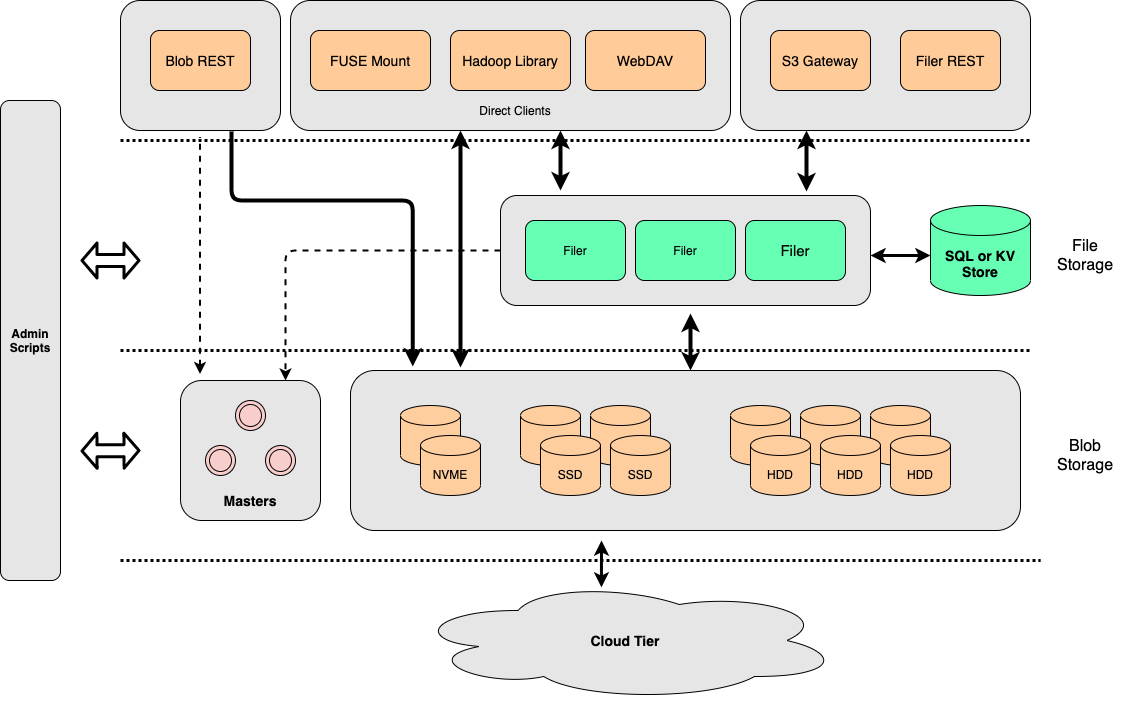
- Master servers, one or a Raft group of three, track which volume lives on which volume server and hand out file ids. They are not in the read path.
- Volume servers store blobs in append-only volume files, keep a 16-byte in-memory index per blob, and replicate or erasure-code at the volume level.
- Filer servers add directories and files on top, with metadata in a store of your choice, and expose HTTP, S3, WebDAV, SFTP, FUSE, and the table catalogs.
The blob store started from Facebook's Haystack, erasure coding takes ideas from f4, and the whole has a lot in common with Tectonic and Colossus. How file ids are assigned, written, and looked up, and why a master that tracks volumes scales, is in Blob Store Architecture; the services are in Components and the white paper.
Compared to Other Systems
Most other distributed file systems seem more complicated than necessary.
SeaweedFS is meant to be fast and simple, in both setup and operation. If you do not understand how it works when you reach here, we've failed! Please raise an issue with any questions or update this file with clarifications.
SeaweedFS is constantly moving forward. Same with other systems. These comparisons can be outdated quickly. Please help to keep them updated.
Compared to HDFS
HDFS uses the chunk approach for each file, and is ideal for storing large files.
SeaweedFS is ideal for serving relatively smaller files quickly and concurrently.
SeaweedFS can also store extra large files by splitting them into manageable data chunks, and store the file ids of the data chunks into a meta chunk. This is managed by "weed upload/download" tool, and the weed master or volume servers are agnostic about it.
Compared to GlusterFS, Ceph
The architectures are mostly the same. SeaweedFS aims to store and read files fast, with a simple and flat architecture. The main differences are
- SeaweedFS optimizes for small files, ensuring O(1) disk seek operation, and can also handle large files.
- SeaweedFS statically assigns a volume id for a file. Locating file content becomes just a lookup of the volume id, which can be easily cached.
- SeaweedFS Filer metadata store can be any well-known and proven data store, e.g., Redis, Cassandra, HBase, Mongodb, Elastic Search, MySql, Postgres, Sqlite, MemSql, TiDB, CockroachDB, Etcd, YDB etc, and is easy to customize.
- SeaweedFS Volume server also communicates directly with clients via HTTP, supporting range queries, direct uploads, etc.
| System | File Metadata | File Content Read | POSIX | REST API | Optimized for large number of small files |
|---|---|---|---|---|---|
| SeaweedFS | lookup volume id, cacheable | O(1) disk seek | Yes | Yes | |
| SeaweedFS Filer | Linearly Scalable, Customizable | O(1) disk seek | FUSE | Yes | Yes |
| GlusterFS | hashing | FUSE, NFS | |||
| Ceph | hashing + rules | FUSE | Yes | ||
| MooseFS | in memory | FUSE | No | ||
| MinIO | separate meta file per drive for each file | Yes | No | ||
| RustFS | separate meta file per drive for each file | Yes | No |
GlusterFS stores files, both directories and content, in configurable volumes called "bricks". It hashes the path and filename into ids, and assigned to virtual volumes, and then mapped to "bricks".
Compared to MooseFS
MooseFS chooses to neglect small file issue. From moosefs 3.0 manual, "even a small file will occupy 64KiB plus additionally 4KiB of checksums and 1KiB for the header", because it "was initially designed for keeping large amounts (like several thousands) of very big files"
MooseFS Master Server keeps all meta data in memory. Same issue as HDFS namenode.
Compared to Ceph
Ceph can be setup similar to SeaweedFS as a key->blob store. It is much more complicated, with the need to support layers on top of it. Here is a more detailed comparison
SeaweedFS has a centralized master group to look up free volumes, while Ceph uses hashing and metadata servers to locate its objects. Having a centralized master makes it easy to code and manage.
Ceph, like SeaweedFS, is based on the object store RADOS. Ceph is rather complicated with mixed reviews.
Ceph uses CRUSH hashing to automatically manage data placement, which is efficient to locate the data. But the data has to be placed according to the CRUSH algorithm. Any wrong configuration would cause data loss. Topology changes, such as adding new servers to increase capacity, will cause data migration with high IO cost to fit the CRUSH algorithm. SeaweedFS places data by assigning them to any writable volumes. If writes to one volume failed, just pick another volume to write. Adding more volumes is also as simple as it can be.
SeaweedFS is optimized for small files. Small files are stored as one continuous block of content, with at most 8 unused bytes between files. Small file access is O(1) disk read.
SeaweedFS Filer uses off-the-shelf stores, such as MySql, Postgres, Sqlite, Mongodb, Redis, Elastic Search, Cassandra, HBase, MemSql, TiDB, CockroachCB, Etcd, YDB, to manage file directories. These stores are proven, scalable, and easier to manage.
| SeaweedFS | comparable to Ceph | advantage |
|---|---|---|
| Master | MDS | simpler |
| Volume | OSD | optimized for small files |
| Filer | Ceph FS | linearly scalable, Customizable, O(1) or O(logN) |
Compared to MinIO, RustFS
Please note, as Apr 25, 2026 MinIO ceased development. It's strongly discouraged to use that unmaintained software with multiple security bugs. RustFS is a MinIO reimplementation in Rust, Apache 2.0 licensed and still developed, keeping MinIO's storage model down to a byte-compatible on-disk format. So the points below apply to both.
MinIO followed AWS S3 closely and was ideal for testing for S3 API. It had good UI, policies, versionings, etc. SeaweedFS is trying to catch up here.
The metadata are in simple files. Each file write incurs extra writes to the corresponding meta file, on every drive of the erasure set. Changing only tags or retention rewrites that meta file on all of them, so the write amplification does not shrink with object size.
There is no optimization for lots of small files. The files are simply stored as is to local disks. Plus the extra meta file and shards for erasure coding, it only amplifies the LOSF problem.
Multiple disk IO are needed to read one file. SeaweedFS has O(1) disk reads, even for erasure coded files.
Erasure coding is full-time. SeaweedFS uses replication on hot data for faster speed and optionally applies erasure coding on warm data.
No POSIX-like API support.
There are specific requirements on storage layout, which makes it hard to scale out and to maintain. An erasure set must be 2 to 16 drives and must divide the drive list symmetrically, and capacity grows or shrinks a whole pool at a time. In SeaweedFS, just start one volume server pointing to the master. That's all.
Benchmark
Unscientific single-machine numbers from a MacBook with an SSD. weed benchmark, 1 million 1KB files, concurrency 16:
| Requests per second | p50 | p99 | |
|---|---|---|---|
| Write | 15,708 | 0.8 ms | 2.6 ms |
| Random read | 47,019 | 0.3 ms | 0.7 ms |
make benchmark runs warp mixed S3 traffic against a local weed server:
Mixed operations.
Operation: DELETE, 10%, Concurrency: 20, Ran 42s.
 * Throughput: 55.13 obj/s

Operation: GET, 45%, Concurrency: 20, Ran 42s.
 * Throughput: 2477.45 MiB/s, 247.75 obj/s

Operation: PUT, 15%, Concurrency: 20, Ran 42s.
 * Throughput: 825.85 MiB/s, 82.59 obj/s

Operation: STAT, 30%, Concurrency: 20, Ran 42s.
 * Throughput: 165.27 obj/s

Cluster Total: 3302.88 MiB/s, 550.51 obj/s over 43s.
Read throughput is bounded by the random read speed of the disks, and grows with every volume server added. More numbers, including multi-node, FUSE, and Hadoop, are in Benchmarks, S3 API Benchmark, FIO benchmark, and Independent Benchmarks.
Enterprise
For enterprise users, please visit seaweedfs.com for the SeaweedFS Enterprise Edition, which has advanced features, including data recovery, self-healing storage, customizable erasure coding, EC vacuum and repair, etc.
License
Licensed under the Apache License, Version 2.0 (the "License"); you may not use this file except in compliance with the License. You may obtain a copy of the License at
http://www.apache.org/licenses/LICENSE-2.0
Unless required by applicable law or agreed to in writing, software distributed under the License is distributed on an "AS IS" BASIS, WITHOUT WARRANTIES OR CONDITIONS OF ANY KIND, either express or implied. See the License for the specific language governing permissions and limitations under the License.
Sponsors
Sponsor SeaweedFS via Patreon
SeaweedFS is an independent Apache-licensed open source project with its ongoing development made possible entirely thanks to the support of these awesome backers. If you'd like to grow SeaweedFS even stronger, please consider joining our sponsors on Patreon.
Your support will be really appreciated by me and other supporters!
Gold Sponsors




Star History
